

How we eliminated 1,400 CVEs in NanoClaw's container images

.png)
Last week we announced Echo's partnership with NanoClaw, designed to extend the vision and security of the open source project. In this post, we want to pull back the curtain and show you exactly how Echo's agentic hardening process works.
How do we detect CVEs?
Before we can fix anything, we need a complete, trustworthy picture of what's actually in the image. We scan and analyze the upstream NanoClaw container using several independent vulnerability scanners, including Trivy, Grype, and Wiz. Here's the raw result of scanning the open source NanoClaw image with Grype, sorted by severity:
.png)
And here's how that stacks up against comparable agent runtimes (Hermes and OpenClaw) across both Grype and Trivy (we also added the NanoClaw Echo image to this comparison - which we will dive into soon):

Now, let’s move to the fixing and CVE reduction.
Step 1: Start with what we can safely bump
Every library in the image is its own problem to solve. So the first thing we do is separate the findings into "safe to bump" and "needs real work." The easy wins are the libraries we know we can upgrade without breaking NanoClaw. Chromium is a great example. It's well known for backward compatibility, so we can trust their updates and bump with confidence. What we are left with are the CVEs that can’t be fixed, and the ones with major jumps. Once we strip out the Chromium-related CVEs, we're still left with roughly 600 vulnerabilities that need fixing. So what happens next?
Step 2: The bumps that require real research
Some upgrades require a major version jump, which will likely not work out of the box. In these cases, we have to patch it ourselves and verify the patch actually holds without breaking the app. See below, a concrete example: Hono's node-server

On paper, this looked like a major jump. But when we dug into the source code, we found the fix was available within a much closer version to what was installed, version 1.19.14 (even if the scanners’ vulnerability databases weren't aware of yet). As part of our contribution to the open source community, we added it to their advisory (it’s a process we do on a daily basis in Echo). We move on to the next step - the “won’t fix” ones.
Step 3: Patching and Backporting
Then you hit the wall: the rest of the findings that are marked as won't fix or that the distro maintainers only fix in new majors, which as mentioned above are likely to break your app. For these, the fix strategy of choice is to backport, which means taking a patch from a newer version of the package and applying it to the older version that the app requires. In our case, that means we find the fix in the latest upstream version, and start working on NanoClaw’s source code directly. There are three main challenges we need to balance between:
- Finding the right fix - understanding where the bug is, tracing the fixing commit, and confirming the fix is genuinely safe and complete - not all fix sources are safe to use, so further research is needed.
- Applying it without breaking anything - the patch has to be compatible with the existing app cleanly.
- Validating - compatibility, functionality and that the CVE was truly resolved.
On top of the application dependencies, there's the operating system underneath everything. NanoClaw's Dockerfile builds on Debian 12
.png)
Debian 12 base images bring a long tail of OS-level vulnerabilities with them. This is where Echo OS comes into play. It's the Linux distro that Echo maintains, and it's compatible with the common upstream distros - Ubuntu, Debian, RHEL, Amazon Linux, and more. Every part of it is built from source so it can be continuously patched by our AI patching agents. It offers thousands of patched OS packages and has eliminated more than 1.1 million CVEs across them.
How Echo conducts backporting
Let’s grab one of the latest backports we did as part of the NanoClaw project. We’ll focus on CVE-2025-59375 in expat. This process is conducted by Echo’s proprietary backporter agent.
Why did we pick CVE-2025-59375?
It's the hardest kind of backport there is - a security fix that isn't a bounds check but a new subsystem threaded through the middle of the library, carried from a newer upstream release down into the older version we ship, and one where the upstream maintainer explicitly warned distributors not to attempt a partial cherry-pick.
How can CVE-2025-59375 be exploited?
An attacker sends a small, entirely well-formed XML document and the parser allocates a wildly disproportionate amount of heap. Upstream's own figure: a ~250 KiB document caused roughly 800 MiB of allocation - an amplification factor of about 3,300. The result is memory exhaustion and process death, or an OOM kill that takes neighbours with it.
Why is it hard to do a backport fix?
expat already had protection against amplification attacks - the billion-laughs defence, which enforces a 100x limit once output passes 8 MiB. But that accounting measures parsed output bytes, direct plus entity expansion. It never looked at the actual heap. So you can stay comfortably inside the entity budget while the parser's internal structures - hash tables, string pools, DTD scaffolding - balloon. he fix had to introduce real allocation accounting, and that's invasive:
• Every internal allocation now goes through `expat_malloc` / `expat_free` / `expat_realloc`, which prepend a `size_t` header to every block so that free and realloc know how much to subtract. That changes the pointer handed back to callers. Mix a raw allocation with a tracked free anywhere and you corrupt the heap.
• Structures that used to carry the memory-function table now carry the parser handle instead, because the counter lives on the root parser. That cascades into signature changes across `dtdCreate`, `dtdReset`, `dtdDestroy`, `dtdCopy`, `hashTableInit`, `poolInit`, `copyString`.
• `parserCreate` gains a parent-parser argument so external-entity child parsers charge the root parser's budget, with strict initialisation ordering - some fields must be set before any tracked allocation can happen.
• Three categories of allocation must deliberately bypass tracking: the app-facing `XML_MemMalloc`/`XML_MemRealloc`, the main input buffer from `XML_GetBuffer`, and the content model handed to the element-declaration handler (applications free that one with plain `free()`). Get any of them wrong and you either corrupt memory or start rejecting legitimate documents.
What did we do and what eventually worked?
The upstream fix was written against a newer expat than the one we ship, so this is a backport from a higher version down to a lower one, and it is large in every direction. Upstream's change spans 17 files; ours ends up touching 9, across the parser core, the public headers, the CLI tool, the documentation and the test suite. The reference patch does not apply to our tree, and landing only the parts that happen to fit produces exactly the state upstream warns about - some allocations tracked and some not, which is worse than not patching at all. What worked was treating it as a rebase rather than an apply. Our agent runs the whole thing end to end: apply, build, run the full upstream test suite, diagnose each failure into a specific class, hand it to the fixer built for that class, and repeat until the build and the entire test suite pass. The classes are things like a hunk whose line numbers no longer match, surrounding context that has changed, a file that has moved or been split, code that no longer compiles against this version, and tests that fail after a clean compile - each with its own dedicated fixer.
Three things had to be solved for this patch specifically:
1. A renamed build guard. The fix wraps the new tracker in `#ifdef XML_DTD`; in our version that macro was renamed to `XML_GE` back in 2.6.0. Keep the old name and the preprocessor silently drops the whole fix - green build, passing tests, scanner sees a patched version, vulnerability still present. This is the most dangerous failure mode in the whole job, because nothing tells you.
2. A re-organized test suite. Upstream had split its monolithic `runtests.c` into per-area files, so the patch's test changes had to be redistributed into `alloc_tests.c` and `nsalloc_tests.c`. That's why our patch touches 9 files where the reference touches 8.
3. Tests that break because the fix is correct. This is what drove us to add a dedicated test-fixing capability. Two real examples: an existing allocation test asserted that parsing survives a certain number of failing reallocations - no longer true once realloc routes through the tracked allocator, so the assertion needed adapting rather than deleting. And one of the new tests raises the amplification limit to prove the limit is enforced; the constant that works upstream doesn't work in our tree, because our parser has allocated a different amount by that point in the test.
That last category is where it's tempting to cheat, so the test-fixer operates under hard rules: it may only modify the CVE patch itself, it may never weaken, skip or disable a test, and any adapted test must still validate the security fix. Fixing the build by silencing the test suite is precisely the outcome we're trying to make impossible.
The final patch is 9 files, 64 hunks, +786/-112, with the complete upstream test suite passing.
The end product
On the left side you can see the reference fix, and on the right, Echo’s backporting agent suggested a fix. This CVE had three steps, the one below is the renaming of the XML_DTD feature guard to XML_GE in 2.6.0.
.png)
Most of the work is done by our triaging agent, with our engineers left to do the final review and approval.
.png)
Step 4: Mirroring and syncing
Once our factory verifies the results and confirms that all available upstream fixes have been applied, the image is built and pushed into the Echo store, and then synced back to NanoClaw. That’s an important note: Echo only implements official fixes. We don’t create custom patches to ensure application compatibility and safety, minimal drift from upstream, and a trustworthy process for devs using Echo OS.
The mirroring
The Echo store can be mirrored to different registries, and in our case to a dedicated registry for NanoClaw. When a new image is published, it's automatically synced to the NanoClaw ECR within minutes. From that point on, every image is continuously monitored for newly fixed CVEs and re-pulled straight from the Echo store to the NanoClaw registry.
The end result
So how clean does it actually get? Here's NanoClaw on Echo versus the alternatives:
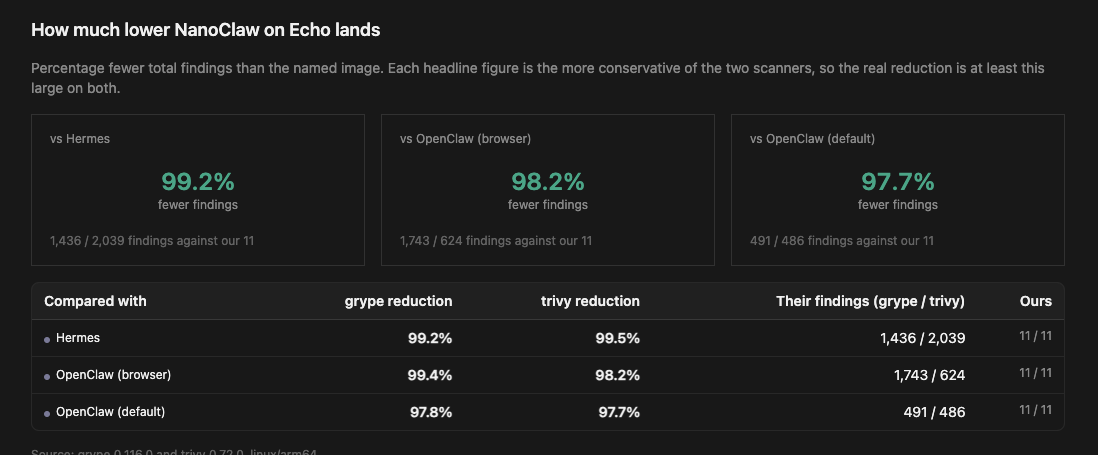
We eliminated roughly 99% of the CVEs. The handful that remain are going to keep being monitored by our factory and resolved as soon as its possible.
That's the whole loop: detect with multiple scanners, bump what's safe, research the tricky ones, backport the "won't fix" findings ourselves, and keep it clean through automated mirroring.
Visit the NanoClaw GitHub repository.
FAQ
What is CVE backporting, and why does Echo use it?
Backporting means taking a security patch from a newer version of a package and applying it to an older version. Echo uses it when a direct upgrade would require a major version jump that risks breaking the app. This lets Echo fix vulnerabilities marked "won't fix" while staying compatible with NanoClaw's existing source code and dependencies.
Which vulnerability scanners does Echo use to detect CVEs?
Echo scans the upstream NanoClaw container with several independent scanners, including Trivy, Grype, and Wiz. Using multiple scanners produces a more complete and trustworthy picture of what's actually in the image. Echo also benchmarks results against comparable agent runtimes like Hermes and OpenClaw to show how the hardened image compares across different scanning tools.
How many CVEs does Echo actually eliminate?
Echo eliminates roughly 99% of CVEs versus the hundreds or thousands found in comparable runtimes. The handful that remain are vulnerabilities with no available upstream fix, patch, or bump. Echo stays fully upstream-compatible by design and waits for the maintainer community to release fixes.
How does the mirroring and syncing process work?
Once Echo's factory verifies all upstream fixes, the image is packaged and pushed to the Echo store, then mirrored to a dedicated NanoClaw registry. From there, every image is continuously monitored for newly fixed CVEs and re-published straight from the Echo store to keep it clean over time.
Frontier models can now find and exploit zero days in your code
Find out what to do when there's no CVE, scanner alert or fix available yet.
What are the 7 blind spots in your vulnerability scans?
Discover when "0 vulnerabilities" doesn't actually mean you're clean.
.avif)
.avif)